GnuCash for Small Business: Features, Screens and Limits
GnuCash is free, open-source accounting software for Windows, macOS and Linux. It makes the ledger visible: accounts, transactions and the relationship between them are central to the experience. That can suit an owner who wants control of a local file and is willing to learn the accounting concepts behind it.
It is a different operating choice from an Australian cloud subscription with integrated payroll and guided BAS workflows. Before using it for a business, establish who will maintain the accounts, review them and prepare the required returns.
What GnuCash can do
The official feature list covers account registers, split transactions, scheduled entries, reports, budgets, customer invoices and supplier bills. It also includes multiple currencies and investment tracking. Statement imports support formats including QIF and OFX, subject to the file your bank provides.
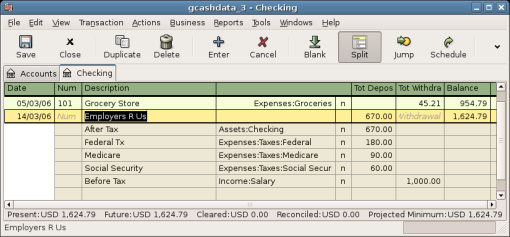
The interface exposes the account structure rather than hiding it behind a few spending categories. You can inspect how a transaction affects assets, liabilities, income or expenses. That visibility is useful when you understand the structure; it is a reason to learn with a test file when you do not.
"Stock" in a share-portfolio feature refers to securities. Do not read it as evidence of retail inventory, warehouse locations or purchase-order fulfilment. A business selling physical stock should evaluate a dedicated stock workflow separately.
Double entry, explained through an invoice
Consider an illustrative $500 service invoice, leaving tax out of the example to focus on the ledger. When the invoice is posted, the business has a customer debt and recorded income. When the customer pays, the bank balance increases and that debt is cleared. The payment is not a second sale.
| Event | What needs to be represented |
|---|---|
| Invoice posted | Customer owes $500; the sale is recorded. |
| Customer pays $200 | Cash increases; $300 remains owing. |
| Customer pays the balance | Cash increases again; the customer debt is cleared. |
GnuCash's accounts-receivable tutorial explains customers, invoices, posting and processing payments. Follow that business workflow instead of entering every incoming bank deposit as new income.
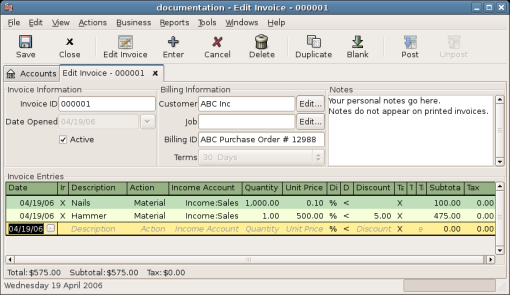
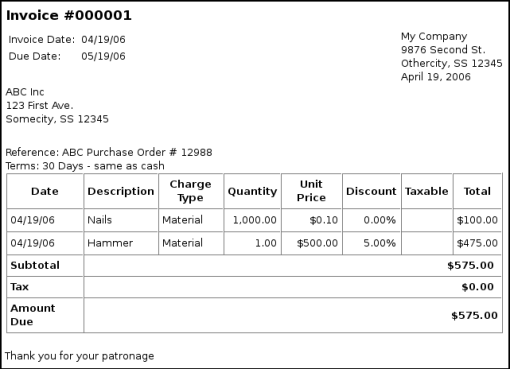
Posting matters because an invoice being drafted and an invoice affecting the books are different states. Inspect the customer balance and the relevant ledger accounts after each step. If you cannot explain the result, resolve it in the test business before entering live records.
Suppliers, bills and the account structure
Supplier bills work through accounts payable: the amount owed is recorded, then payment settles it. The business-features guide is the useful starting point for customer and supplier workflows, billing terms and tax tables.
Set up the accounts with the person who will review the books. A loan repayment, equipment purchase and ordinary operating expense may all be money out, but they do not necessarily belong in the same expense account. GnuCash will faithfully record the classification you enter; it cannot establish that the classification is appropriate.
Try one unpaid supplier bill, a partial payment and a credit. Check the supplier balance alongside the bank account. Avoid fixing an unexplained difference by adding an arbitrary journal solely to make two totals match.
Statement imports and reconciliation
Importing reduces repeated typing. Reconciliation checks the imported and manually entered transactions against the bank's statement. They are separate steps, and a successful import message says nothing about whether the account is complete.
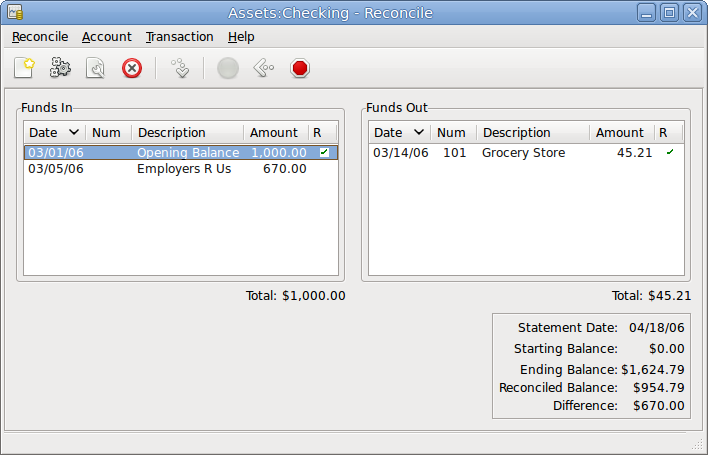
Begin with a short statement period. Check its opening balance, closing balance, dates and transaction count. Review possible matches where you have already entered a receipt or payment. An overlapping import can otherwise make the bank activity appear twice.
GnuCash's documented online-banking functions include country-specific services. Do not infer Australian bank-feed coverage from a German banking feature. Test the actual Australian statement format and plan around the import process that works for your bank.
If you often make split payments, try those during the trial. A single bank withdrawal might need several ledger allocations. The split-transaction capability is useful precisely because the bank line and the accounting explanation do not always have a one-to-one relationship.
Reports, budgets and currencies
GnuCash provides financial reports and customisable report options. A report's account selection, dates and settings matter as much as its title. A profit and loss report should not be expected to equal cash in the bank; unpaid invoices, liabilities and asset movements explain some of the difference.
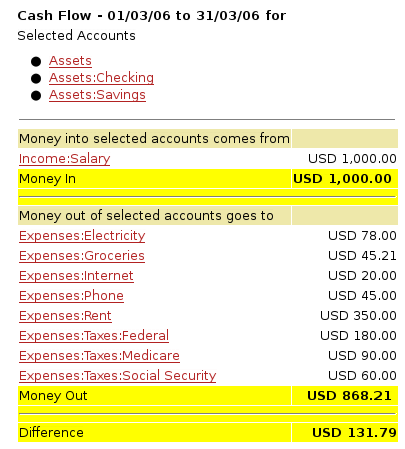
Have the adviser produce the reports they need from a small test file. Ask them to trace one balance back to the underlying transactions and show how they would correct an error. This is more informative than counting available report names.
Multiple-currency and investment functions add another layer of complexity. A small business with foreign-currency transactions should test its actual invoice, payment and exchange-difference process. Keep personal investment records and business books appropriately separated rather than combining them merely because the application can hold both.
Australian GST and payroll
GnuCash's tax tables and reports are configurable. That means the setup and output need an Australian review; it does not establish an integrated BAS lodgement process. Agree how the records will support preparation and where submission will occur.
The payroll chapter explicitly says GnuCash does not have an integrated payroll system. It explains how to record payroll expenses and liabilities while calculations occur outside the application. That is not Australian STP reporting, automatic award interpretation or a tax-table service.
An employer needs an appropriate external payroll arrangement and a process for entering or importing its totals. The person reviewing the books should reconcile wages, deductions, liabilities and payments with that external payroll record.
Files, backups and sharing with an accountant
GnuCash supports more than one storage format. Its backup guide explains the timestamped backup and log files associated with XML storage. Read the instructions for the format you actually use; a nearby log file should not be mistaken for a complete replacement for the accounts.
Keep a separate backup copy and restore it as a test. Confirm the business, dates and latest transactions. Backups stored only beside the live file can be lost with the same device, so decide where another protected copy will be kept.
Use a controlled single-editor handover. Sharing a folder or choosing database storage should not be treated as proof of safe simultaneous editing. If the accountant works on a copy while you keep entering transactions, agree how their adjustments return to the active file.
Who should consider it?
GnuCash can suit a technically comfortable owner with modest requirements and an adviser willing to work with its output. It can also be useful for learning how the ledger fits together. The absence of a licence fee is meaningful, but it should be weighed against the time needed to maintain a reliable workflow.
A team needing constant shared access, integrated Australian payroll or sophisticated stock operations should compare products selected for those requirements. Avoid making the cheapest licence carry processes that will be rebuilt manually elsewhere.
Key takeaways
- GnuCash makes the double-entry ledger and business invoice workflow explicit.
- Statement importing, reconciliation and backup restoration all need a tested routine.
- Australian tax preparation and payroll reporting require a separate, verified process.
Where to get help
Use the official tutorial beside a disposable test file, then have your adviser review the reports. Manager vs GnuCash compares the free desktop options; the software selector adds cloud alternatives.
Did this guide help you finish your task?
Optional feedback helps us see which guides need more work.
Feedback is off while site analytics is unavailable or disabled.
We report your choice and this guide’s page through site analytics. Your analytics preference applies. About feedback and privacy.
Where to go from here
Manager vs GnuCash: Comparing Free Desktop Accounting
Compare the practical tradeoffs against another product on your shortlist.
3 min readAccounting Software Trial Checklist: Test Before You Buy
Test the workflow with your own requirements before buying.
3 min readSwitch Accounting Software: An Australian Business Checklist
Plan the records and checks needed for a live migration.
4 min read
General information only. This guide doesn't take your personal or business circumstances into account and isn't financial, legal or tax advice. Rates and thresholds change — check the official sources linked in this guide and get qualified advice where your circumstances require it.