Manager Accounting: Free Desktop, Cloud and Features
Manager offers a free desktop accounting application and a paid Cloud edition. The desktop product can suit an owner who wants a local file and is prepared to manage it. The Cloud edition changes how people share and access the books. Neither choice removes the need to set up accounts correctly and review the resulting records.
Manager is freeware, not an open-source project like GnuCash, as its developer confirms in the official forum. "Free" describes the desktop licence price; it does not mean there is no work or cost in training, backups, Australian payroll or year-end preparation.
Desktop versus Cloud
| Question | Desktop | Cloud |
|---|---|---|
| Licence cost | Free | Paid subscription; confirm current currency and amount |
| Where you work | Installed application and local business data | Browser access to the hosted business |
| Collaboration | Single-user working model | Multi-user access and permissions |
| Internet for ordinary access | Desktop can work without it | Required for the hosted service |
| Who manages local recovery? | You | Hosting changes the arrangement, but still test your exports and exit plan |
Manager's desktop page describes Windows, Mac and Linux availability, single-user operation and no desktop usage/time limit. Its Cloud page describes shared access, permissions and downloading a backup that can be opened in Desktop. Confirm the current download and operating-system requirements before installation, especially when following an older guide.
What is inside the accounting system?
Manager's feature list covers a general ledger, banking, invoices, receivables, payables, quotes, sales and purchase orders, inventory, time billing, fixed assets and financial reports. It also lists multicurrency and manufacturing-related functions. That is a broad set of tools; you still need to establish which ones solve the business's work and how they connect.
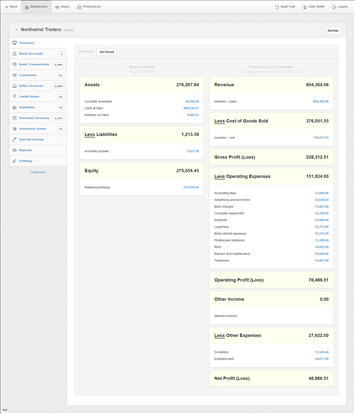
A small consultancy may mostly use invoices, receipts, expenses and reports. A business selling goods has more to configure around items, purchasing and stock. Keep a test business while learning so exploratory entries do not become unexplained live balances.
Start with the accounts and opening information. An opening bank balance alone does not represent unpaid customers, supplier debts, loans, assets or tax liabilities. Have the person preparing the accounts agree the opening position before importing transactions.
Customers, invoices and receiving payment
Customer records identify who owes money. An invoice establishes the sale and amount due; the receipt records money arriving. Applying the receipt to the relevant invoice keeps the customer balance meaningful.
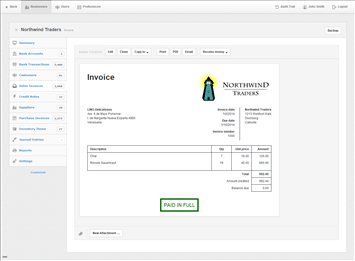
Use an illustrative service invoice with a part payment. Check the unpaid balance and customer statement, then record the remaining payment. Creating another income transaction at the second stage would misrepresent the original sale. This is a bookkeeping test to work through, not a claim that we operated a live customer account.
Credit notes, recurring billing and billable expenses are also in Manager's documented range. Demonstrate the particular correction or repeating charge your business needs. Invoice appearance matters less than whether the balances remain understandable after a refund or adjustment.
Suppliers, purchases and inventory
Supplier bills help track money owed before payment. Purchase orders describe goods or services requested from a supplier, while payments settle the bill. Test how an order becomes a purchase and how a supplier credit reduces the outstanding balance.
Inventory features deserve a separate demonstration if physical goods are important. Use a receipt of stock, a sale, a return and a quantity adjustment. Check the item quantity, inventory value and the financial report together. If components are assembled into a product, establish how the manufacturing-related functions handle the process and its costs.
A feature name alone does not establish suitability for serial-number tracking, several warehouses or a particular costing method. Write those requirements down and use the inventory trial checklist before importing the full item list.
Bank statements and reconciliation
Manager supports statement importing and bank reconciliation. The free desktop product should not be assumed to include a ready-made live feed for every Australian bank. Verify any current feed or extension separately, including its charges and access permissions.
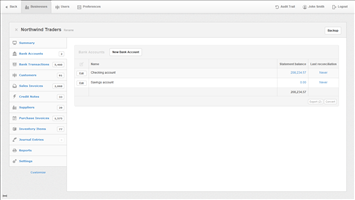
Manager's reconciliation guide uses the statement date and closing balance as part of the check. Importing rows is only the start: identify existing payments, transfers, missing entries and duplicates, then explain any difference from the statement.
A useful test is to import a small period twice in a disposable test business and understand what duplicate-detection or correction work is required. Do not perform that experiment in the active accounts. Also confirm whether your bank's actual export file uses the date and amount formats expected by the importer.
Reports, assets and currencies
The financial-report range includes profit and loss, balance sheet, trial balance, aged receivables and aged payables. These answer different questions. Receivables show customer amounts still owing, while the bank balance records cash movements. A business can show profit and still be waiting on customer money.
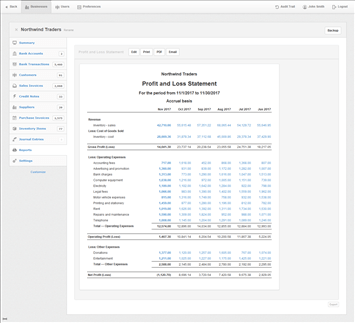
Manager also lists fixed assets and multicurrency. Have an adviser check asset opening values and depreciation settings, and test an overseas invoice through payment and any exchange difference. Do not treat an available field as confirmation that a particular accounting policy has been applied correctly.
For departmental or project reporting, agree how transactions will be assigned and who reviews incomplete coding. A report can only separate work that was recorded consistently in the first place.
Australian GST and payroll
Manager has configurable tax records and reports. The Australian GST setup and the route from those reports to a lodged BAS need to be checked by the person responsible for the return. This guide does not claim a direct Australian BAS connection merely because the software has a tax-report feature.
The same applies to payroll. A payroll or payslip function can record wages and liabilities without supplying Australian tax-table updates, award interpretation or STP lodgement. Identify the current external payroll/reporting arrangement you will use and how its totals reach the ledger.
If a low licence cost is the reason for choosing Manager, price that complete arrangement. Regular manual reconstruction can cost more than a subscription that supplies the workflow directly.
Backups, shared work and leaving the system
Keep one clearly identified active desktop file. If you send a copy to an accountant and continue entering transactions in your own copy, you need an explicit process for bringing their corrections back. Renaming several copies "final" does not solve that problem.
Make a backup, store a copy separately and restore it in a test location. Check the business name, latest transactions and relevant reports. Record which software version opens it. This tests recovery rather than merely proving that a backup button exists.
Cloud's downloadable-backup route is useful, but moving back to Desktop changes shared access to a single-user arrangement. Test the proposed exit before relying on it, and clarify where supporting documents and any connected-service data will be kept.
Key takeaways
- Free Desktop is a local, single-user choice; Cloud supplies a different access model.
- Manager has broad accounting functions, but Australian reporting and specialist workflows need explicit testing.
- Backup restoration and accountant handover are part of operating the system.
Where to get help
Use the official guides beside a small test business, then have your adviser review the reports. Manager vs GnuCash explains the two free-desktop choices, while the software comparison tool includes hosted alternatives.
Did this guide help you finish your task?
Optional feedback helps us see which guides need more work.
Feedback is off while site analytics is unavailable or disabled.
We report your choice and this guide’s page through site analytics. Your analytics preference applies. About feedback and privacy.
Where to go from here
Manager vs GnuCash: Comparing Free Desktop Accounting
Compare the practical tradeoffs against another product on your shortlist.
3 min readAccounting Software Trial Checklist: Test Before You Buy
Test the workflow with your own requirements before buying.
3 min readSwitch Accounting Software: An Australian Business Checklist
Plan the records and checks needed for a live migration.
4 min read
General information only. This guide doesn't take your personal or business circumstances into account and isn't financial, legal or tax advice. Rates and thresholds change — check the official sources linked in this guide and get qualified advice where your circumstances require it.