MYOB Online vs Desktop: Business and AccountRight Explained
“We use MYOB online” doesn't tell you which software a business has. It might mean MYOB Business Lite or Pro, or it might mean an AccountRight company file opened in a browser. Those can look similar on screen while having quite different subscription entitlements and migration options.
The useful starting point is to identify the product, plan and interface separately. This guide explains how they fit together, where you can switch between screens, and where a change involves moving your accounting records.
Three things people mean by MYOB online
| What someone calls it | What they may actually be using | What that means |
|---|---|---|
| MYOB online or MYOB Business | Business Lite or Pro in a browser | A browser-based product. Buying it does not give you the AccountRight Windows application. |
| AccountRight online | An AccountRight company file stored online | The file can be opened through the Windows application or supported browser access. |
| MYOB desktop | The AccountRight Windows application | An installed interface; that description alone doesn't mean the company file works offline. |
MYOB also sells other products, including Solo and enterprise offerings. Check the full name on your subscription before comparing a feature or following a support article. A screenshot with the MYOB logo is not enough to identify a plan.
The product boundaries below were checked against MYOB's official documentation on 12 September 2026. Screenshots are MYOB examples, not a record of us testing a customer's books.
AccountRight: two interfaces opening the same online file
If your AccountRight file is online, you can open that file in the Windows application or a browser. You are not exporting the records to a second ledger each time you change interface. A bookkeeper can work in Windows while an owner uses supported browser functions to review the same business.
That is the genuinely interchangeable part. Navigation, terminology and available functions differ, so the work you can complete is not identical.
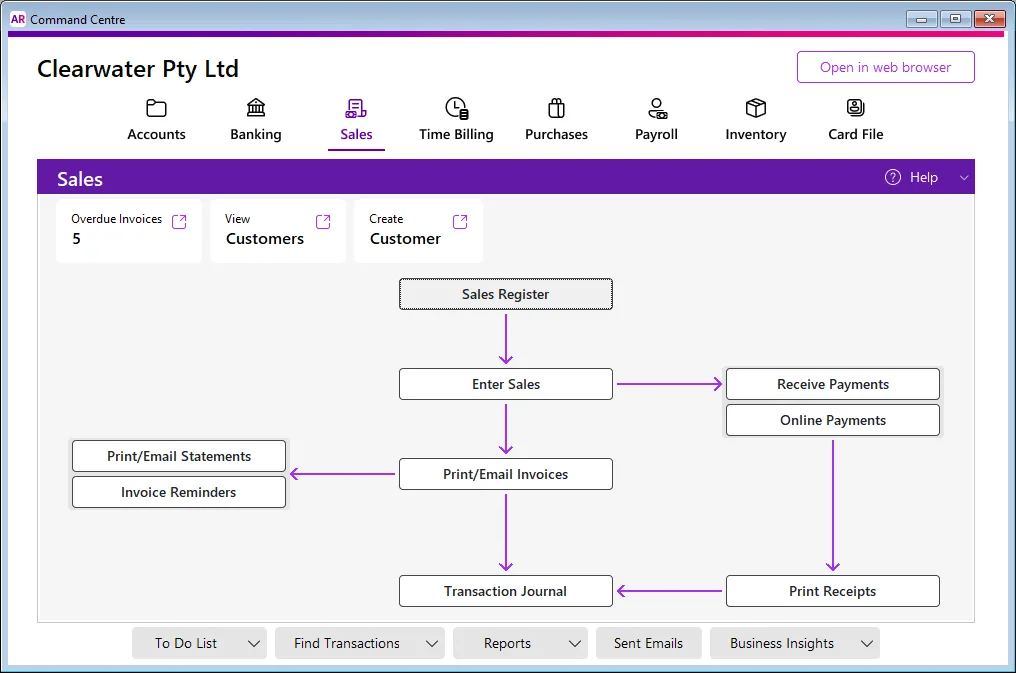
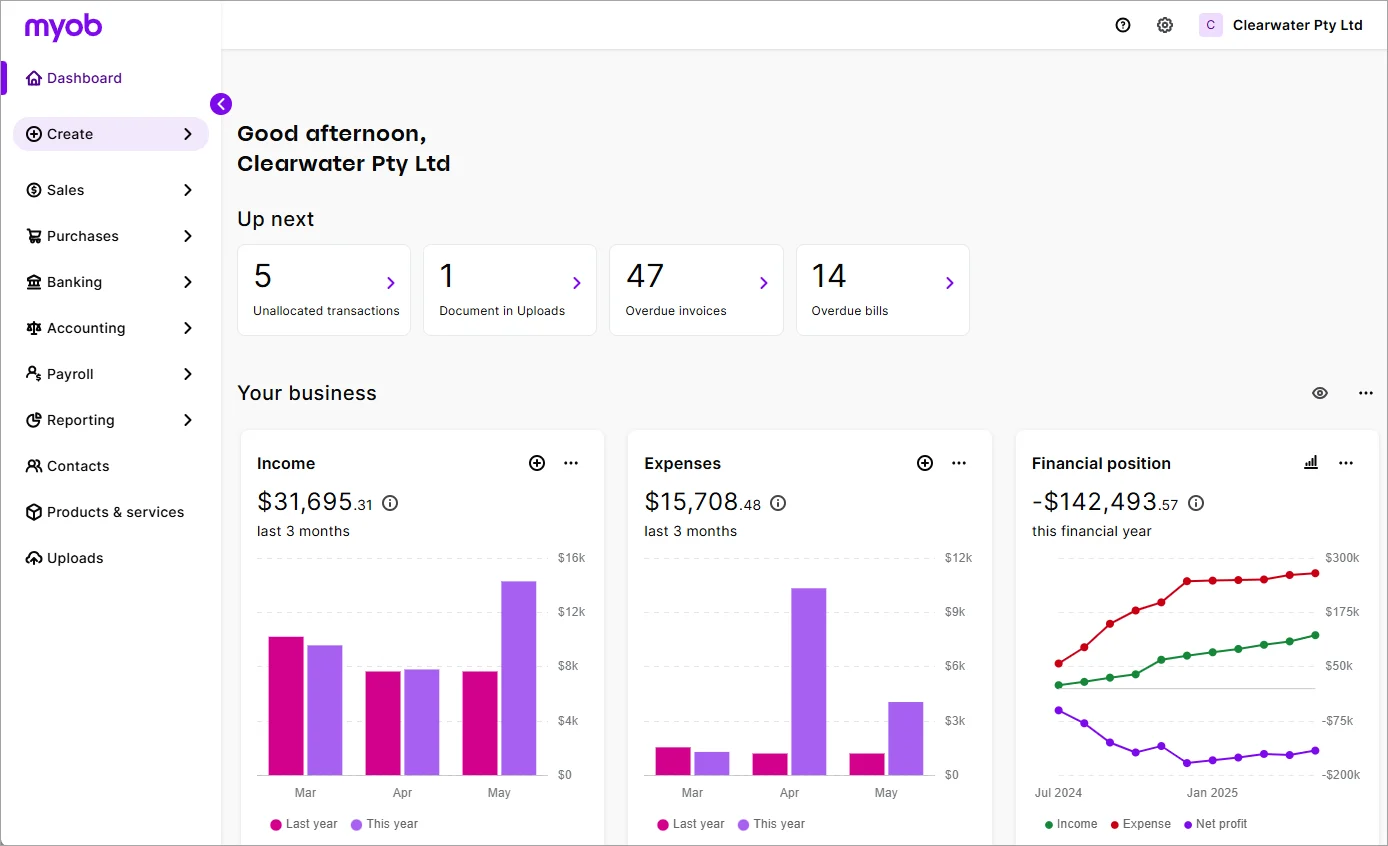
In the browser, some familiar AccountRight terminology changes: accounts are called categories, for example. That can make a familiar task look as if it has disappeared. Start from the relevant browser help page rather than expecting the desktop menu names to match.
MYOB's browser-access instructions explain opening the online file. Creating a new AccountRight company file still needs the desktop application.
Which tasks need Windows, and which benefit from the browser?
It is tempting to think of the browser as a cut-down copy. That misses features available specifically in the browser, including report packs and expanded reporting. The differences run in both directions.
| Task or capability | What to check in AccountRight |
|---|---|
| Routine invoices, purchases and orders | Both interfaces support important daily transactions, but entry layouts and detailed options differ. |
| Time billing and specialist sales layouts | Desktop requirements remain for time billing and Professional, Miscellaneous and Time Billing layouts. |
| Multicurrency transactions and multiple stock locations | Check the appropriate AccountRight plan and the desktop workflow. Browser access alone does not supply these functions. |
| Payroll and employee payment files | Both interfaces support payroll workflows; configuration, subscription and service requirements still apply. |
| eInvoices and document handling | The browser has functions such as eInvoicing and split document view that differ from desktop handling. |
| Financial reports | The browser has report packs and reporting options beyond a simple reproduction of the desktop reports. |
This is a selection from MYOB's desktop/browser capability comparison, not a promise that every action in a broad category behaves identically. Use the detailed table in our AccountRight guide to plan a demonstration.
For a Mac-based owner, browser access may cover reviewing reports and routine transactions. It does not remove a colleague's Windows requirement for a desktop-only task. Write down who performs each job and which device they use before deciding whether the arrangement works for the whole team.
Desktop no longer means an offline file
This distinction became particularly important in 2026. MYOB's current instructions say the latest AccountRight version no longer supports working offline, and the PC edition shows online files from the change introduced on 17 June 2026.
The Windows application still exists. The change concerns the working company file and online access, not the disappearance of the desktop interface. Someone who installed AccountRight years ago may therefore have a different setup from the current supported workflow.
Read MYOB's instructions for putting a company file online for your edition and version. Do not choose a new subscription on the assumption that an old offline setup will continue indefinitely. An exported backup and the ability to operate normally without internet are also different things.
MYOB Business Lite and Pro are separate product choices
Lite and Pro handle browser-based bookkeeping: quotes, invoices, expenses, bank reconciliation and Australian reporting, with payroll charged by employee. They can be a sensible fit when the business does not need AccountRight's more involved desktop, stock or time-billing functions.
The Lite/Pro distinction is mostly about the required allowances and capabilities. Lite permits two connected bank accounts and payroll for up to two employees. Pro expands bank-account and employee capacity and adds capabilities including more reporting and timesheet/roster functions. Payroll is advertised at an additional $3 per employee per month on these plans.
Our MYOB Business guide covers these features in detail, including the inventory add-on and the difference between preparing a BAS and completing the lodgement process. MYOB's Lite and Pro pages remain the place to confirm the subscription you are ordering.
Stock: compare the transaction, not the word inventory
Two products can both list inventory while supporting very different operations. A business selling occasional products needs to know what is on hand and what it cost. A wholesaler may also need part deliveries, supplier orders, stock at different locations and components assembled into finished items.
AccountRight's desktop inventory extends into functions such as backorders, building items from components, pricing levels and, on the appropriate offering, multiple locations. MYOB Business inventory follows a simpler model. Extra item capacity alone does not turn it into the same system.
Take one real ordering sequence to a demonstration: order ten units, receive six, sell two, return one and inspect what remains on order and in stock. Then check the value, not just the quantity. MYOB's inventory product comparison helps identify which operations deserve that test.
Jobs: recording a cost is different from running time billing
Job tracking helps you associate income and costs with a piece of work. Time billing adds another question: how recorded time turns into a charge to the customer. Neither should be assumed from a generic “projects” label.
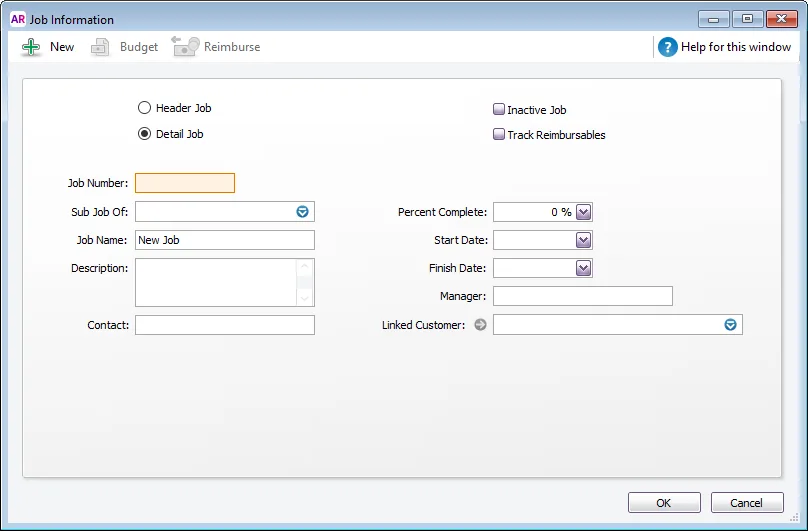
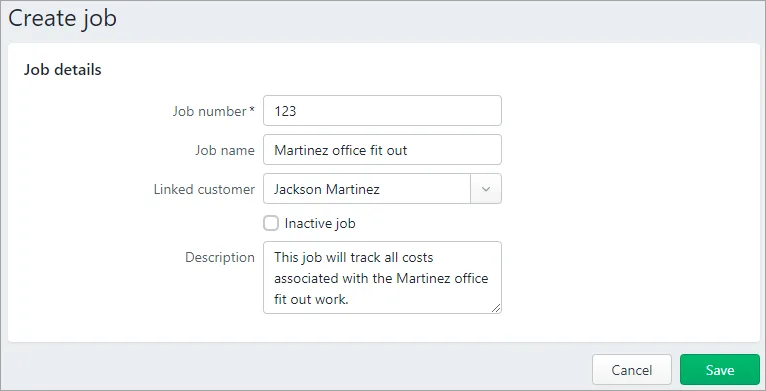
These two MYOB help examples show why a job can be familiar across interfaces without every field and process being identical. For a builder, try assigning a supplier bill and payroll cost to the right job. For a consultancy, try turning time into the required invoice layout. The useful comparison is the completed job report and bill, not how similar the entry forms look.
What does the price difference buy you?
The comparison records Lite at $35/month or $315/year, Pro at $70/month and AccountRight Plus at $165/month at standard pricing. Promotions, tax presentation, payroll charges, inventory extras and payment services need to be checked against the actual quote. Premier is a separate plan decision.
As an illustration using unchanged standard monthly prices, Pro with four employees at $3 each comes to $82/month before any other extras. That is simply $70 + (4 × $3). It is not a like-for-like replacement quote for AccountRight Plus: the stock, time-billing and reporting requirements still need to be met.
Put both complete quotes into the accounting software cost calculator. Include setup, conversion, add-ons and any Windows arrangement. Paying less each month is useful only if the resulting process handles the work without creating more manual effort than it saves.
Switching screens, changing plans and migrating are different actions
| Proposed change | What needs to happen |
|---|---|
| AccountRight Windows to AccountRight browser | Open the same eligible online file; confirm the browser supports the intended task. |
| Lite to Pro | Confirm the subscription change and newly available entitlements with MYOB. |
| AccountRight to Business Lite/Pro | Assess and convert the records into the destination product. This is not simply opening the existing AccountRight file in another screen. |
| Older offline AccountRight to a current online setup | Check version, file eligibility, subscription and upload requirements before changing the working environment. |
MYOB offers a right-size migration service for eligible businesses. Its stated eligibility matters: a file that has used AccountRight's multicurrency feature is not eligible for that service. Do not assume a small current balance or a quiet trading year removes a historical file limitation.
Before agreeing to a conversion, get a written scope covering transaction history, attachments, payroll records, inventory, jobs, custom forms and recurring entries. Record anything that will remain in an archive. A successful opening balance import does not prove all operational history moved across.
A practical migration and trial checklist
- Identify the exact current product, edition, version and file location.
- List the transactions and reports the business actually depends on, including occasional year-end tasks.
- Demonstrate those tasks in the destination plan and intended interface.
- Agree the conversion scope, cutover date and responsibility for corrections.
- Reconcile bank accounts and check receivables, payables, stock and payroll totals before and after conversion.
- Test the retained archive and document how the business will retrieve older records.
The software trial worksheet provides space to record those results. Keep the existing records accessible until you have checked the converted file and archive.
Key takeaways
- AccountRight's browser and Windows interfaces can open the same online company file, but their capabilities differ.
- MYOB Business Lite/Pro are separate product choices; moving from AccountRight requires a migration assessment.
- Choose around actual stock, payroll, job, reporting and device requirements. “Online” and “desktop” are not enough to describe the decision.
Where to get help
MYOB support can confirm the supported version and product entitlements. Your bookkeeper or accountant can help identify which records, controls and reports must survive a change. Ask each party to confirm their part of the migration before setting the cutover date.
Did this guide help you finish your task?
Optional feedback helps us see which guides need more work.
Feedback is off while site analytics is unavailable or disabled.
We report your choice and this guide’s page through site analytics. Your analytics preference applies. About feedback and privacy.
Where to go from here
Accounting Software Trial Checklist: Test Before You Buy
Use the same transactions to trial both products.
3 min readAccounting Software Costs: Compare the Full Three-Year Price
Compare payroll, extras and setup costs on the same basis.
3 min readSwitch Accounting Software: An Australian Business Checklist
Once you've chosen, plan the conversion and retained archive.
4 min read
General information only. This guide doesn't take your personal or business circumstances into account and isn't financial, legal or tax advice. Rates and thresholds change — check the official sources linked in this guide and get qualified advice where your circumstances require it.