MYOB Business Lite vs Pro (2026): Limits and Costs
MYOB Business Lite ($35 a month or $315 a year) suits businesses with up to two bank accounts and up to two employees. Pro ($70 a month or $630 a year) removes both limits and adds timesheets, rosters and unlimited sales orders. From 1 November 2026 payroll on either plan costs $5 per employee a month, up from $3. Prices include GST, as at 18 October 2026.
| MYOB Business Lite | MYOB Business Pro | |
|---|---|---|
| Standard price | $35 a month or $315 a year | $70 a month or $630 a year |
| Current new-customer offer | Monthly: 14-day trial, then 50% off for 6 months ($17.50). Annual: 70% off the first year ($94.50) | Monthly: 14-day trial, then 70% off for 6 months ($21). Annual: 50% off the first year ($315) |
| Connected bank accounts | Up to 2 | Unlimited |
| Employees you can pay | Up to 2 | Unlimited |
| Payroll fee per employee paid each month | $3; $5 from 1 November 2026 | $3; $5 from 1 November 2026 |
| Timesheets and rosters | ✗ | ✓ |
| Unlimited sales orders | ✗ | ✓ |
| Reports | Basic | Standard |
| Quotes and invoices | Unlimited | Unlimited |
| User profiles | Unlimited | Unlimited |
| GST tracking and BAS lodgement | ✓ | ✓ |
| Inventory | 1 location, up to 10 product attributes; unlimited inventory $22 a month extra | Same as Lite |
| Job tracking | ✓ | ✓ (bill by time and job budgets need AccountRight) |
| AI BAS (beta) | Extra purchase | Extra purchase |
| Multiple currencies, stocktake, priority support | ✗ (AccountRight) | ✗ (AccountRight) |
| Where you use it | Web browser and MYOB Assist app | Web browser and MYOB Assist app |
Source: MYOB pricing page, Lite and Pro product pages and MYOB's pricing update notice, checked 18 October 2026. Offers end 15 January 2027 unless MYOB varies them and discount the base plan only. For Solo, AccountRight, Payroll Only and year-one costs on every MYOB plan, see our full MYOB pricing guide.
The naming is confusing because AccountRight also has browser access and appears under MYOB Business branding. Lite and Pro are not simply the browser view of an AccountRight file. If you already use AccountRight, read the product comparison before changing subscriptions.
Who each plan suits
| Choose Lite if you… | Choose Pro if you… |
|---|---|
| Need bank feeds from one or two accounts | Need bank feeds from three or more accounts |
| Pay nobody, yourself only, or one or two staff | Pay three or more people in any month, or expect to soon |
| Don't roster staff or collect timesheets in MYOB | Want staff timesheets and rosters to flow into the pay run |
| Invoice from quotes but rarely raise sales orders | Raise sales orders regularly |
| Are a sole trader or small service business watching costs | Want broader standard reports for a bookkeeper or lender |
A business with three connected accounts may need Pro even without employees. A business with two staff should compare Lite's complete payroll cost, not just the base accounting fee. These limits are more useful than a generic label such as "best for small business".
What does each plan cost at your headcount?
| Employees paid each month | Lite, monthly billing | Pro, monthly billing | Lite, annual billing (year) | Pro, annual billing (year) |
|---|---|---|---|---|
| 0 | $35 a month ($420 a year) | $70 a month ($840 a year) | $315 | $630 |
| 1 | $40 ($480) | $75 ($900) | $375 | $690 |
| 2 | $45 ($540) | $80 ($960) | $435 | $750 |
| 3 | Not allowed | $85 ($1,020) | Not allowed | $810 |
| 5 | Not allowed | $95 ($1,140) | Not allowed | $930 |
| 10 | Not allowed | $120 ($1,440) | Not allowed | $1,230 |
Illustrative, standard prices including GST checked 18 October 2026, with payroll at $5 per employee a month (the rate from 1 November 2026). On annual billing the plan is paid yearly but payroll is still billed monthly. Excludes the $22 inventory add-on, AI BAS and payment fees.
Pro always costs $35 a month (or $315 a year on annual billing) more than Lite at the same headcount, because the payroll fee is identical on both plans. So the choice is about limits and features, not payroll cost. The November change adds $24 a year for each employee on either plan.
When to upgrade: the triggers
From Lite to Pro
- A third bank account needs a feed. Lite connects only two.
- A third person needs paying in a month. Upgrade before the pay run, because Lite cannot process it. Remember an owner paid through payroll counts.
- You want timesheets and rosters in MYOB rather than a separate app.
- You raise sales orders often enough to need them unlimited.
- Your bookkeeper or lender wants more reporting than Lite's basic set.
From Pro to AccountRight
- Stock becomes central: you need stocktakes, more than 10 product attributes, backorders or item building. AccountRight Plus includes unlimited inventory.
- You bill by time or need job budgets. MYOB directs these to AccountRight.
- You pay about 15 or more staff. On annual billing, Pro plus payroll ($630 + $60 per employee a year) overtakes AccountRight Plus ($1,485 with unlimited payroll) at 15 employees; on monthly billing, at 20.
- You trade in foreign currencies, hold stock in several locations or run a second business. Those need AccountRight Premier.
MYOB lets you upgrade from your account at any time and says you can move back later, but you pay for the upgraded plan until the end of the billing period. Moving to AccountRight is a migration into a different product; see MYOB Business vs AccountRight.
Invoicing and everyday sales
Lite and Pro create quotes and invoices using customer and item information. Payment options and reminders help with collection, while customer balances show what remains unpaid. An invoice should reflect the agreed work, tax treatment and payment terms before it is sent.
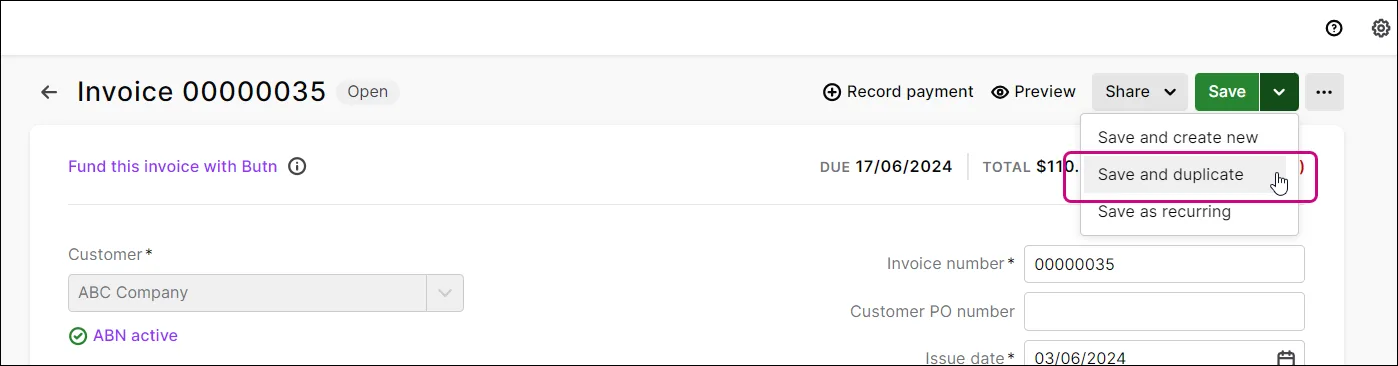
The image shows the shared browser invoice workflow, not proof that every payment method or plan option is included. Online payment services have their own fees and eligibility. Test a part payment, a customer credit and a reminder after a dispute is resolved.
If you reuse an invoice, review the copied customer, dates and amounts. Duplication is useful for similar work, but it can also carry forward a mistake. The same applies to recurring billing: make someone responsible for updating it when the agreement changes.
Bills, receipt capture and bank feeds
Supplier bills record money owed; bank payments settle it. Keep the supporting receipt or bill associated with the entry so the reviewer can see what was purchased. A feed imports transaction data, while matching and reconciliation decide how it relates to the records already in the books. On Lite, plan which two accounts get feeds, because MYOB allows only two connected accounts.
For example, a supplier payment may already exist against a bill. Creating a new expense from the bank line would duplicate the purchase. Include that case, an owner transfer and a refund in your trial worksheet.
MYOB Assist is the mobile companion for invoicing and receipt capture on both plans. It does not supply AccountRight's Windows features. The Assist overview explains its scope.
If you still use the older MYOB Invoice app, MYOB says it retired the app in Australia on 29 September 2026 and directs users to Assist. That is a mobile-app change, not a reason to migrate the underlying accounting product. See the retirement instructions.
Jobs and knowing what work costs
Lite and Pro can track job income and expenses. This helps separate a customer's project from the business's general overheads. Decide how materials and other direct costs will be assigned before relying on a job margin.
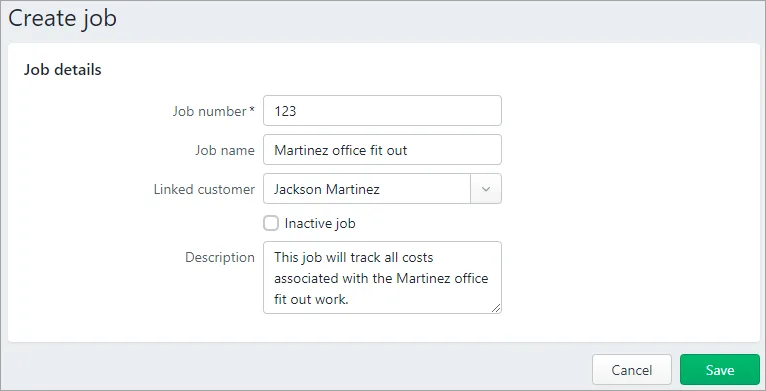
The browser job form is intentionally different from AccountRight's desktop job window. Do not infer time billing, job budgets or every desktop job function from the presence of a job field. MYOB directs businesses needing time billing or individual job budgets towards AccountRight.
For an illustrative installation, record a deposit, materials and the final invoice against the job. Ask how employee labour is reflected and whether the report includes all costs you want to measure. Unassigned costs can make a job look more profitable than it was.
Payroll and the employee limit
Payroll is added per employee on Lite and Pro: $3 a month for each employee paid in a calendar month, rising to $5 from 1 November 2026, with the new fee appearing on invoices from 1 December 2026. The process covers employee information, pay runs, Single Touch Payroll and automated super, but setup needs to match the business. Check pay settings, leave, superannuation and year-to-date records with the person responsible for payroll.
MYOB's counting rules matter for the bill and for Lite's limit:
- Once per employee per month, however many pay runs you process for them.
- The month is set by the date of payment in the pay run, not the pay period.
- An owner paid through payroll counts as an employee.
- Zero-dollar pays don't count, but deleted or reversed pays still do.
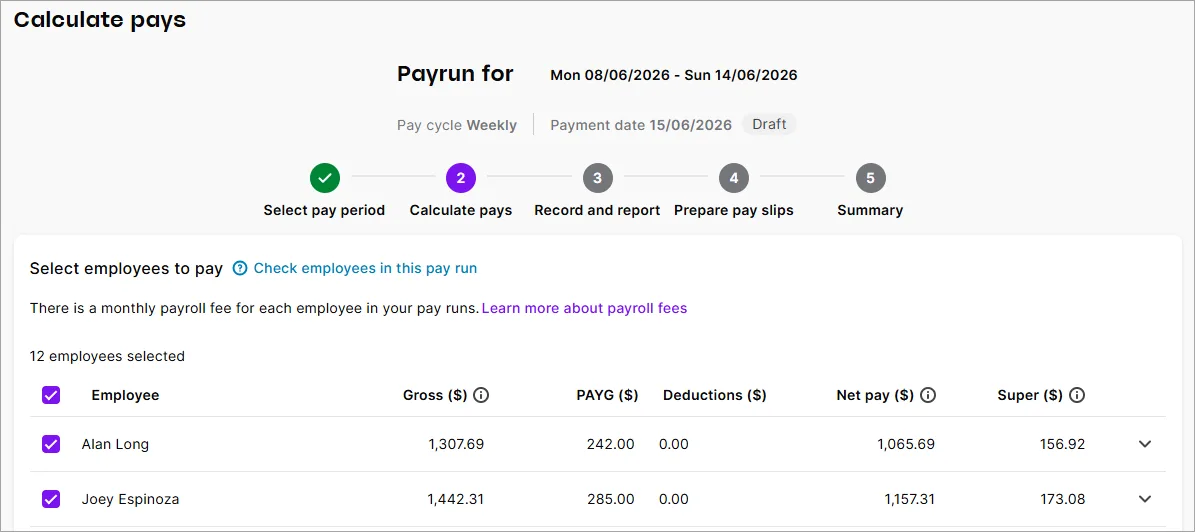
The payroll screenshot is a broader browser example, not a Lite entitlement example. Lite stops at two employees. A pay-run illustration showing a larger team should not be used to suggest otherwise.
Pro's timesheets and rosters may be useful when staff hours change. Check who submits time, who approves it and how it reaches the pay run. A published schedule and an approved payroll record are not the same thing. MYOB's payroll overview describes the product's payroll functions, and our guides to Single Touch Payroll and payday super cover the obligations. If staff are on awards with penalty rates, compare a dedicated tool in our payroll software comparison.
Inventory: simple stock or a more demanding operation?
Lite and Pro include inventory and order management for a single location with up to 10 product attributes. MYOB's pricing table lists unlimited inventory as a $22 a month add-on for either plan, and it reserves stocktakes for AccountRight and multiple locations for Premier. See the current plan matrix.
MYOB's inventory guidance describes a browser workflow suited to simpler stock-on-hand selling. If you backorder, assemble products from components, need pricing tiers or receive stock before the supplier bill, investigate AccountRight's relevant desktop functions instead of stretching the simpler workflow.
Start a trial with a real representative item range. Enter a purchase, sale, return and adjustment, then inspect quantity and value. The point is to establish the process that staff will actually follow. Our inventory checklist gives you a sequence.
GST, BAS and the limits of automation
Lite and Pro advertise GST tracking and BAS lodgement. Correct business settings and tax treatment still come first. Review a taxable sale, a GST-free transaction and a supplier credit, then trace the resulting report totals back to those records. Our GST and BAS guide explains the codes.
MYOB also sells AI BAS, a beta product available as an extra purchase on Lite and Pro. Its current bundle is $25 a month for AI BAS plus 80% off the Lite or Pro base plan for 12 months, as a 12-month commitment billed monthly, with no refund for early cancellation. Do not assume it is included in every subscription, or that its output removes the review step. Its product page describes the offer and customer restrictions.
For any lodgement workflow, retain the acceptance record. A report being ready, a calculation being suggested and a statement being accepted are different events.
Access, migration and keeping the books usable
Invite the accountant or bookkeeper using their own access and agree who can change settings, enter transactions and run payroll. Both plans allow unlimited user profiles at no extra cost, but anyone who can submit pay runs can incur payroll fees, so restrict payroll access. Responsibility for the books should still be clear.
Moving from AccountRight to Lite or Pro is a migration into a different product. MYOB's right-sizing service has eligibility and transfer conditions, including a restriction for files that have used multicurrency. Do not cancel AccountRight until you know the conversion scope and have checked the result. Coming from Xero, QuickBooks or Reckon, MYOB says a migration partner will move the current and previous financial year's transactions at no cost.
Ask about historical transactions, attachments, stock, jobs, payroll and archives. Test the reports the adviser needs. If the proposed saving requires regular manual work to replace missing features, include that work in the cost comparison. The switching checklist covers the cutover.
Work through a plan-choice example
Suppose an illustrative business needs two connected accounts and payroll for two staff. From 1 November 2026, Lite's $35 base plus 2 × $5 payroll is $45 a month, or $540 for twelve months. Pro's $70 base plus the same payroll is $80 a month, or $960. On annual billing, the figures are $435 for Lite ($315 plus $120 payroll) and $750 for Pro ($630 plus $120). These calculations exclude any extra inventory, payment fees or other add-ons and assume unchanged pricing.
A third connected account or third employee changes the Lite eligibility question; the cheaper total alone cannot decide the plan. Write down which requirement rules a plan out before comparing offers. These are calculations from published plan information, not results of an in-product trial. Check the current pricing and plan terms, and if you are weighing MYOB against Xero, see Xero vs MYOB.
Try the beginner practice pack before moving your records.
Key takeaways
- Lite ($35 a month or $315 a year) allows two bank accounts and two employees; Pro ($70 or $630) removes both limits and adds timesheets, rosters and unlimited sales orders.
- Payroll costs the same on both plans: $3 per employee a month, rising to $5 on 1 November 2026.
- Pro always costs $35 a month more than Lite at the same headcount, so choose on limits and features.
- Upgrade to Pro for a third account or employee; look at AccountRight for stocktakes, time billing, multi-currency or about 15 or more staff.
- Extra inventory, payment processing and AI BAS have separate conditions or charges.
- AccountRight browser access and migration to Lite or Pro are different decisions.
Where to get help
- MYOB: plans and pricing, MYOB support and the free MYOB Academy.
- Full MYOB price list: our MYOB pricing guide covers every plan, offer and year-one cost.
- If you already use a desktop file: the detailed MYOB comparison, or compare another product in the software selector.
- Your bookkeeper or BAS agent: bring the migration checklist to the adviser reviewing the change, and use the MYOB bookkeeping checklist for the monthly routine.
Related tasks
Browse more accounting software guides.
Did this guide help you finish your task?
Optional feedback helps us see which guides need more work.
Feedback is off while site analytics is unavailable or disabled.
We report your choice and this guide’s page through site analytics. Your analytics preference applies. About feedback and privacy.
Where to go from here
MYOB Business vs QuickBooks Online: An Australian Comparison
Compare the practical tradeoffs against another product on your shortlist.
3 min readMYOB Business vs Reckon One: Which Setup Fits Your Business?
Compare the practical tradeoffs against another product on your shortlist.
3 min readAccounting Software Trial Checklist: Test Before You Buy
Test the workflow with your own requirements before buying.
3 min read
Frequently asked questions
What is the difference between MYOB Lite and Pro?
Lite connects up to two bank accounts and pays up to two employees. Pro removes both limits and adds timesheets, rosters, unlimited sales orders and standard rather than basic reports. Both are browser-based, include unlimited invoices and users, and lodge BAS. Lite costs $35 a month or $315 a year and Pro $70 a month or $630 a year, including GST (as at 18 October 2026).
How many employees can MYOB Lite pay?
Two. MYOB counts unique employees paid in a calendar month, using the pay run's date of payment, and an owner paid through payroll counts. To pay a third person in a month you must upgrade to Pro before the pay run. Payroll costs $3 per employee a month on both plans, rising to $5 from 1 November 2026, and you pay it once per employee however many pay runs you process.
Can I upgrade from MYOB Lite to Pro later?
Yes. You can change plans from your MYOB account at any time, and the upgrade takes effect immediately. Your data stays in the same file because Lite and Pro are the same product at different limits. MYOB says you can move back later, but you pay for the upgraded plan until the end of the billing period. Moving to AccountRight is a different product and needs a migration.
Does MYOB Lite include inventory?
Yes, at a basic level. Lite and Pro both include inventory and order management for one location and up to 10 product attributes. Unlimited inventory is an add-on at $22 a month on either plan. Stocktakes, multiple locations, backorders and item building are AccountRight features, so a stock-heavy business should compare AccountRight Plus or Premier (as at 18 October 2026).
Is MYOB Lite enough for a sole trader?
Often, yes. Lite gives unlimited quotes and invoices, two bank feeds, GST tracking, BAS lodgement and payroll for up to two employees. A sole trader who only needs to track GST from a phone could use MYOB Solo at $99 a year instead, but MYOB says Solo cannot be changed to another plan later and it does not lodge BAS. Pro is only needed for a third bank account, more staff or rosters.
What is the difference between MYOB Pro and AccountRight?
Pro is browser-based and charges payroll per employee. AccountRight Plus ($165 a month or $1,485 a year) adds a Windows desktop application, unlimited payroll at no extra cost, unlimited inventory, stocktake, time billing, job budgets and priority support. Premier ($210 a month) adds multiple currencies, multiple stock locations and another business. On annual billing, Plus becomes cheaper than Pro plus payroll at 15 employees.
General information only. This guide doesn't take your personal or business circumstances into account and isn't financial, legal or tax advice. Rates and thresholds change — check the official sources linked in this guide and get qualified advice where your circumstances require it.