QuickBooks Online Australia (2026): Plans and Pricing
QuickBooks Online costs $33 (Simple Start), $60 (Essentials), $84 (Plus) or $125 (Advanced) a month in Australia, including GST, as at 18 October 2026. New subscribers who buy now get 70% off, which Intuit's banner says lasts six months and its terms say lasts three. Payroll is extra: $6 per employee a month on Standard Payroll, or $10 a month plus $6 per employee on Advanced.
| Plan | Users | Standard a month | 70% off a month | First 12 months (3 months off, per terms) | First 12 months (6 months off, per banner) | Standard 12 months |
|---|---|---|---|---|---|---|
| Simple Start | 1 | $33 | $9.90 | $326.70 | $257.40 | $396 |
| Essentials | 3 | $60 | $18.00 | $594.00 | $468.00 | $720 |
| Plus | 5 | $84 | $25.20 | $831.60 | $655.20 | $1,008 |
| Advanced | 25 | $125 | $37.50 | $1,237.50 | $975.00 | $1,500 |
Prices in AUD including GST, checked on quickbooks.intuit.com/au on 18 October 2026. First-year figures are ASBG calculations for the base plan only: (discounted price × discounted months) + (standard price × remaining months). Every plan includes access for your accountant.
This independent guide helps you choose and test an Australian plan. We have no commercial relationship with Intuit. For account access or a product problem, use Intuit's Australian site and official support.
The 70% off offer: six months on the banner, three in the terms
The pricing page headline advertises 70% off for six months, and each plan card shows a saving calculated over six months: $138.60 on Simple Start, which is six months of the $23.10 monthly discount. The offer terms in the page's "Important pricing details" panel tell a different story. They say the 70% discount applies "for the first 3 months of your subscription", and that the then-current monthly price is charged from month 4.
Until Intuit makes the two agree, plan on three discounted months and treat a six-month discount as a bonus if your order confirmation shows it. The gap is worth $69.30 on Simple Start and $262.50 on Advanced over the first year.
Other points from the same terms (checked 18 October 2026):
- New subscribers only. Intuit can ask for information to verify eligibility and can revoke the offer and charge the standard price if it decides you are ineligible.
- Payroll and QuickBooks Time are never discounted. They are billed separately each month according to use.
- A 50% off for 12 months offer for new subscribers also appears in the terms, though it is not advertised on the page. If you are offered it, it beats three months at 70% off in year one: Simple Start would cost $198 for the first 12 months.
- Existing subscribers who upgrade to Essentials, Plus or Advanced can get 50% off the upgraded plan for three months.
- Buy now or trial, not both. The pricing page offers either the 70% buy-now price or a 30-day free trial at full price afterwards.
The ongoing cost is what matters after year one. Our three-year cost method shows how to stop a promotion hiding the standard price.
Simple Start, Essentials, Plus or Advanced?
The first decision is not how many features sound useful. It is which tasks and users the subscription must accommodate.
| Australian plan | Users | Features that help distinguish it |
|---|---|---|
| Simple Start | 1 | Income and expenses, unlimited invoices and quotes, GST and BAS lodgement, bank feeds, receipt capture and kilometre tracking. |
| Essentials | 3 | Adds supplier bills, recurring transactions and invoices, multi-currency, a cash flow planner and free data migration. |
| Plus | 5 | Adds inventory, purchase and sales orders, projects and project profitability, budgeting and up to 40 classes and locations. |
| Advanced | 25 | Adds custom role permissions, workflow automation, forecasting, custom dashboards and reports, Excel data sync, backup and restore, revenue recognition and fixed assets. |
Source: QuickBooks AU pricing comparison table, checked 18 October 2026.
A sole trader can outgrow Simple Start's workflow before needing another user. A business that records supplier bills before paying them, for example, should assess Essentials. A service business wanting job profitability should inspect Plus even if it sells no physical stock.
Feature comparison by plan
| Feature (as listed by Intuit) | Simple Start | Essentials | Plus | Advanced |
|---|---|---|---|---|
| Invoices and payments | Unlimited | Unlimited | Unlimited | Unlimited |
| GST tracking and BAS e-lodgement | ✓ | ✓ | ✓ | ✓ |
| Automated bank feeds and auto-matching | ✓ | ✓ | ✓ | ✓ |
| Supplier and bill management | ✗ | ✓ | ✓ | ✓ |
| Recurring invoices | ✗ | ✓ | ✓ | ✓ |
| Multi-currency | ✗ | ✓ | ✓ | ✓ |
| Cash flow planner | ✗ | ✓ | ✓ | ✓ |
| Inventory, purchase orders and sales orders | ✗ | ✗ | ✓ | ✓ |
| Projects and project profitability | ✗ | ✗ | ✓ | ✓ |
| Budgeting | ✗ | ✗ | ✓ | ✓ |
| Classes and locations | ✗ | ✗ | Up to 40 | Unlimited |
| Chart of accounts | 250 | 250 | 250 | Unlimited |
| Custom fields | ✗ | 4 | 4 | 12 |
| Forecasting, custom dashboards, custom report builder | ✗ | ✗ | ✗ | ✓ |
| Workflow automation and custom role permissions | ✗ | ✗ | ✗ | ✓ |
| Backup and restore, Excel data sync | ✗ | ✗ | ✗ | ✓ |
| Free data migration | ✗ | ✓ | ✓ | ✓ |
| Phone and chat support, free onboarding session | ✓ | ✓ | ✓ | ✓ |
| Payroll (separate subscription) | Add-on | Add-on | Add-on | Add-on |
Source: QuickBooks AU pricing page, checked 18 October 2026. Intuit also lists AI features by plan; it says they are currently included at no extra cost, and Finance AI (Advanced only) is not available when multi-currency is switched on.
The Australian plan comparison is the place to confirm current entitlements before you buy.
How much does QuickBooks payroll cost?
QuickBooks' Australian payroll is powered by Employment Hero and sold as an add-on to any QuickBooks Online plan. You pay for each active employee, which Intuit defines as someone paid at least once in the billing month. Ordinary accounting-user limits do not tell you how many employees can be paid.
| Standard Payroll | Advanced Payroll | |
|---|---|---|
| Monthly fee | $0 | $10 |
| Per active employee a month | $6 | $6 |
| Pay runs, payslips and reports | ✓ | ✓ |
| Single Touch Payroll and SuperStream | ✓ | ✓ |
| Employee self-service (EH Work app) and leave management | ✓ | ✓ |
| Payday Super ready | ✓ | ✓ |
| Free onboarding and support | ✓ | ✓ |
| Automated modern award interpretation | ✗ | ✓ |
| Pay conditions engine | ✗ | ✓ |
| Rostering | ✗ | ✓ |
| Time and attendance, employee time kiosk | ✗ | ✓ |
| Discounted by the 70% offer | No | No |
Prices in AUD including GST, from the QuickBooks AU payroll page, checked 18 October 2026.
| Active employees | Standard a month | Standard a year | Advanced a month | Advanced a year |
|---|---|---|---|---|
| 1 | $6 | $72 | $16 | $192 |
| 2 | $12 | $144 | $22 | $264 |
| 5 | $30 | $360 | $40 | $480 |
| 10 | $60 | $720 | $70 | $840 |
| 20 | $120 | $1,440 | $130 | $1,560 |
Payroll only, before the QuickBooks Online plan. ASBG calculations from Intuit's published prices.
Because payroll is priced per head, there are no plan jumps when you hire. Compare that with Xero, where paying a third person means moving from Grow to Comprehensive (+$29 a month), as our Xero pricing guide shows.
Advanced Payroll adds award interpretation, rostering and time and attendance. Those are payroll-plan differences, not the same thing as choosing QuickBooks Online Advanced. QuickBooks' payroll page says super is paid through Beam, a clearing house, from inside QuickBooks Payroll, which matters under the payday super rules that began on 1 July 2026. Intuit also notes that QuickBooks Payroll cannot be used in the QuickBooks mobile apps; staff use the separate EH Work app.
Automation does not choose the correct award, classification or employment arrangement for you. Have the setup reviewed, then test an ordinary pay, leave and any overtime or allowances your team actually uses. If you are unsure which award applies, start with finding your employees' modern award. Employees may use a self-service portal, but someone still needs to approve changes and check the result. Intuit's employee self-service explanation shows that part of the workflow, and our payroll software comparison and Single Touch Payroll guide cover the wider choice.
What does QuickBooks cost with payroll? Four worked examples
| Illustrative business | Setup | Standard a year | First year (3 months at 70% off) |
|---|---|---|---|
| Sole trader, no staff, no supplier bills | Simple Start | $396 | $326.70 |
| Trade business, 2 staff, pays supplier bills | Essentials + Standard Payroll | $864 | $738.00 |
| Cafe, 5 award-based staff on rosters | Essentials + Advanced Payroll | $1,200 | $1,074.00 |
| Retailer, 10 staff, stock and purchase orders | Plus + Advanced Payroll | $1,848 | $1,671.60 |
Illustrative, prices including GST checked 18 October 2026. Payroll is never discounted, so it is charged in full in year one. Excludes payment processing fees and connected apps.
Is QuickBooks cheaper than Xero or MYOB?
It depends on which QuickBooks plan you need. Simple Start plus payroll is the cheapest of the three at five and ten employees, but it has one user and no supplier bills. On Essentials, MYOB is cheaper from two employees and Xero is dearer.
| Employees paid | QuickBooks Simple Start + Standard Payroll | QuickBooks Essentials + Standard Payroll | Xero (monthly billing only) | MYOB, annual base billing | MYOB, monthly billing |
|---|---|---|---|---|---|
| 0 | $396 | $720 | $444 (Ignite) or $936 (Grow) | $315 (Lite) | $420 (Lite) |
| 2 | $540 | $864 | $936 (Grow) | $435 (Lite) | $540 (Lite) |
| 5 | $756 | $1,080 | $1,284 (Comprehensive) | $930 (Pro) | $1,140 (Pro) |
| 10 | $1,116 | $1,440 | $1,716 (Ultimate 10) | $1,230 (Pro) | $1,440 (Pro) |
Standard annual cost including GST, no promotions, checked 18 October 2026. MYOB includes payroll at $5 per employee a month, the rate from 1 November 2026, and its annual option covers the base plan only. Xero includes payroll up to each plan's cap.
What the totals leave out:
- Xero Ignite limits you to 20 invoices and 5 bills a month. Full figures are in our Xero pricing guide.
- MYOB Lite connects up to two bank accounts and pays up to two employees. See our MYOB pricing guide.
- QuickBooks users are capped at 1, 3, 5 or 25 by plan, while Xero, MYOB Lite and MYOB Pro have no per-user charge.
For a feature-by-feature view, read Xero vs QuickBooks and MYOB vs QuickBooks.
Free trial, billing and cancelling
- Free trial: 30 days on any plan, with no credit card required, as at 18 October 2026. Intuit's terms say the trial covers QuickBooks Online and QuickBooks Payroll, including Advanced Payroll, and you can pay any number of employees free during it. To keep going after 30 days you add a card and pay the then-current monthly price, with no promotional discount.
- Annual billing: you can prepay 12 months at a discount on the monthly fee. Intuit does not publish the size of the discount on the pricing page. Payroll is still charged monthly. You get no refund if you cancel during the prepaid year, and the plan auto-renews at the then-current annual price.
- Changing plans: you can move up or down between Simple Start, Essentials, Plus and Advanced at any time, including on an annual plan.
- Cancelling: Settings, then Subscription and Billing, then Cancel. Monthly plans end at the end of the billing period; annual plans at the end of the 12 months. There are no pro-rata refunds.
- Moving your data in: Intuit covers a basic migration through a third party on Essentials, Plus and Advanced.
- Several businesses: Intuit offers a multiple-file discount when you buy more than one subscription in one order; ask its sales team for the rate.
Before cancelling any accounting subscription, export the reports, payroll records and attachments you must keep. The obligation to keep business records stays with you; see our record-keeping guide. A GST-registered business can usually claim the GST in the fee as a credit and deduct the rest; the Xero pricing guide sets out the ATO rules, which apply the same way to QuickBooks.
QuickBooks Online pros and cons
Pros
- No invoice caps on any plan, unlike Xero's entry plan.
- Multi-currency from $60 a month (Essentials), against $107 for Xero Comprehensive and $210 for MYOB AccountRight Premier.
- Award interpretation is available inside your accounting setup through Advanced Payroll, for $10 a month plus $6 per employee. Xero's and MYOB's plan tables do not list award interpretation.
- Per-employee payroll pricing with no plan jumps as you hire.
- Inventory with purchase and sales orders at $84 a month on Plus.
- 30-day free trial with no card, phone and chat support and a free onboarding session on every plan.
Cons
- Users are capped by plan, so a team of four people who need logins must buy Plus.
- Simple Start has no supplier bills or recurring invoices, so many businesses with trade accounts need Essentials.
- Payroll is a second system run by Employment Hero, with its own app and charges, and it cannot be used in the QuickBooks mobile apps.
- The promotion is unclear, with the banner and the terms giving different discount periods.
- Annual prepayment is non-refundable, and the annual discount is not published on the pricing page.
Who is QuickBooks Online best for?
These verdicts are based on Intuit's published plan limits and the prices above, judged on four criteria: the hard limits that rule a plan out, total cost with payroll, whether award interpretation is needed, and how many people need a login. They are not results of hands-on testing.
| If you are… | Our verdict | Why |
|---|---|---|
| A sole trader who invoices often and has no supplier bills | Simple Start can suit | Unlimited invoices and BAS lodgement for $33; cheaper sole-trader tools exist, see accounting software for sole traders |
| A service business that bills overseas clients | Essentials is good value | Multi-currency and bills at $60, the lowest multi-currency price of the big three |
| An employer with award-based, rostered staff | Strong choice | Essentials or Plus plus Advanced Payroll gives award interpretation without a separate payroll vendor |
| A product seller with simple stock | Plus is worth testing | Inventory, purchase orders and sales orders at $84 |
| A team where five or more people need logins | Look at Xero or MYOB too | QuickBooks charges by plan for users; Xero and MYOB Business do not |
| A business whose bookkeeper works in another product | Ask first | Adviser support usually matters more than a small price difference |
Following an invoice from quote to payment
The sales workflow begins with a customer and the goods or services being sold. An accepted quote can lead to an invoice; payments and credits then explain the balance still owing. The useful view is not just this month's sales total, but which customers have outstanding amounts and why.
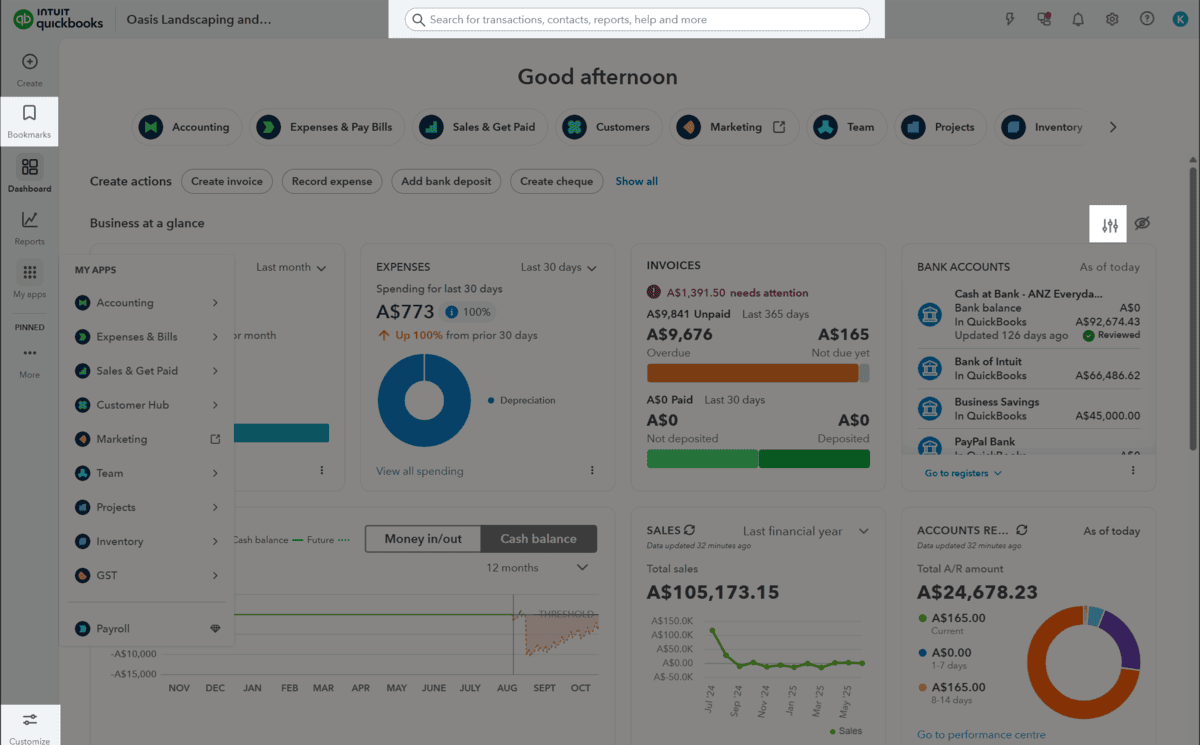
Try an invoice with a deposit and a later balance payment. Check what the customer sees, how the outstanding amount is displayed and what happens if you issue a credit. If a payment provider deducts its fee before depositing the money, the books need to account for both the receipt and the fee.
Recurring invoices start at Essentials. They are relevant for regular retainers, rent or repeating charges, and they should reflect the contract rather than quietly carry forward an out-of-date amount. Agree who checks recurring templates when prices or customer arrangements change.
Expenses, supplier bills and bank matching
An expense records spending; a supplier bill records money owed before payment. That difference is why the bill-management boundary between Simple Start and Essentials matters. For a business with trade accounts, bills help answer "what must we pay next week?", not just "what left the bank last week?"
Connected bank feeds bring statement activity into the workflow on every plan. Matching an existing bill payment or customer receipt avoids recording it again. A bank rule can help with repeated entries, but the rule needs enough detail to avoid sweeping unrelated transactions into the same category.
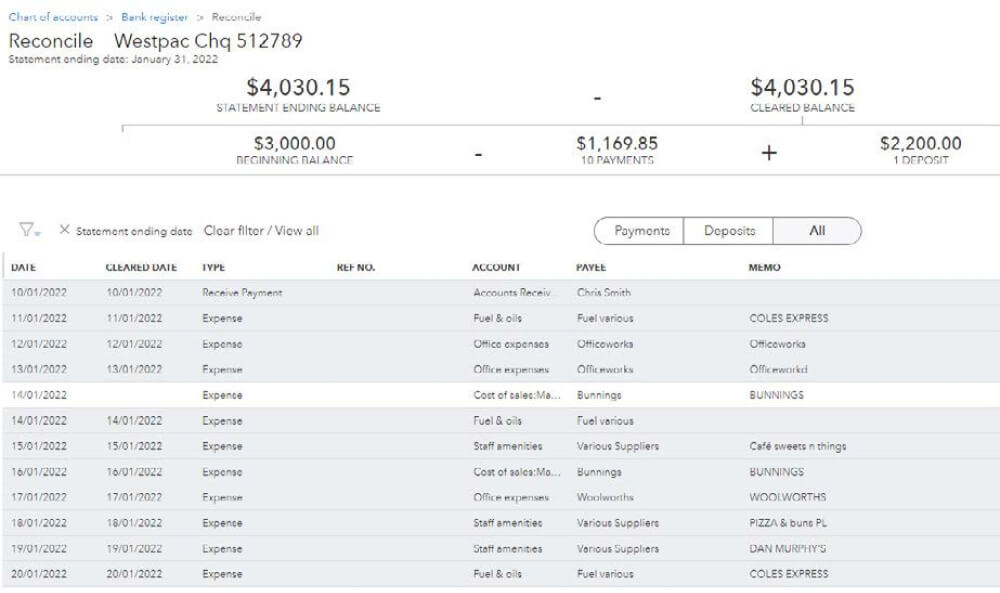
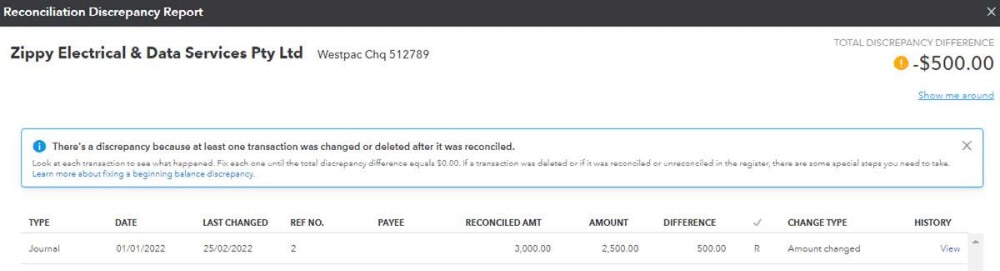
Test a bank transfer, a refund and one deposit covering several invoices. Keep bank feeds and reconciliation as separate checks: the imported lines need to be accounted for correctly, and the resulting balance needs to agree with the statement. Our bank-feed explainer covers the difference.
Intuit's Australian product overview describes its bookkeeping and expense functions. Where a help article also mentions other Intuit products, use the Australian plan list to establish what your subscription actually includes.
Projects and the cost of a job
Projects are available in QuickBooks Online Plus and Advanced. They group income and costs associated with a customer's job so you can inspect its transactions and reports. Intuit's project setup guide explains the function.
For an illustrative installation job, record the customer invoice, materials and subcontractor costs against that job. Then ask whether employee labour and other direct costs are represented as intended. A project report can look profitable simply because some costs were never assigned to it.
Projects, classes and locations answer different questions. A project might be one installation; a location might be a branch; a class might divide types of work. Plus allows up to 40 classes and locations combined and Advanced removes the limit. Decide what management question each label is meant to answer before creating overlapping categories that staff use inconsistently.
Inventory and purchasing
Plus and Advanced have inventory tracking, purchase orders and sales orders. Intuit documents quantities on hand, low-stock information and reporting on buying and selling. Non-inventory products and service items can also appear on sales forms, but listing an item on an invoice is not itself a stock-control process. See the Australian inventory guide.
Test the goods your business sells, including one return and a stock adjustment. If you need multiple warehouses, assemblies, serial numbers or specialised fulfilment, ask whether the workflow is native, requires another app or is outside the proposed setup. Avoid buying an integration until someone can explain which system creates purchases and sales and how corrections flow between them.
Our inventory checklist gives you a demonstration sequence. It is especially useful when a sales presentation shows item creation but never follows a purchase through delivery, payment and a return.
GST, BAS and reporting
Every Australian plan includes GST tracking and BAS e-lodgement, and Intuit advertises an AI pre-lodgement check. Start by checking the business's GST settings and the treatment of representative sales and purchases. Review the report before submitting it and retain the acceptance record separately from the working report. Our GST and BAS guide explains the underlying rules.
The same discipline applies to management reports. Compare the date range and cash/accrual basis before deciding that two totals conflict. Trace an unpaid invoice and an unpaid supplier bill through the reports during your trial; it is a useful way to understand why profit and cash are not the same figure.
Advanced's custom reports and role permissions may matter when different staff need different access or when a business uses a more structured monthly reporting routine. Request a demonstration of the specific custom report or approval process. A longer feature list does not prove it will replace the spreadsheets you currently maintain.
What to check before moving across
Ask what the conversion includes: historical transactions, unpaid invoices and bills, attachments, tax settings and payroll data. Intuit's free basic migration applies on Essentials, Plus and Advanced, so confirm what "basic" covers for your file. Keep a copy of agreed opening balances and compare them after conversion. Test whether the reports your adviser relies on can be retrieved before the old system is cancelled.
Make a complete monthly quote with accounting, payroll, payment processing and connected apps separated. Include the cost of training staff who enter bills or reconcile bank lines. Our cost guide compares those costs over a longer period, after a promotional offer has ended, and the switching checklist covers the cutover.
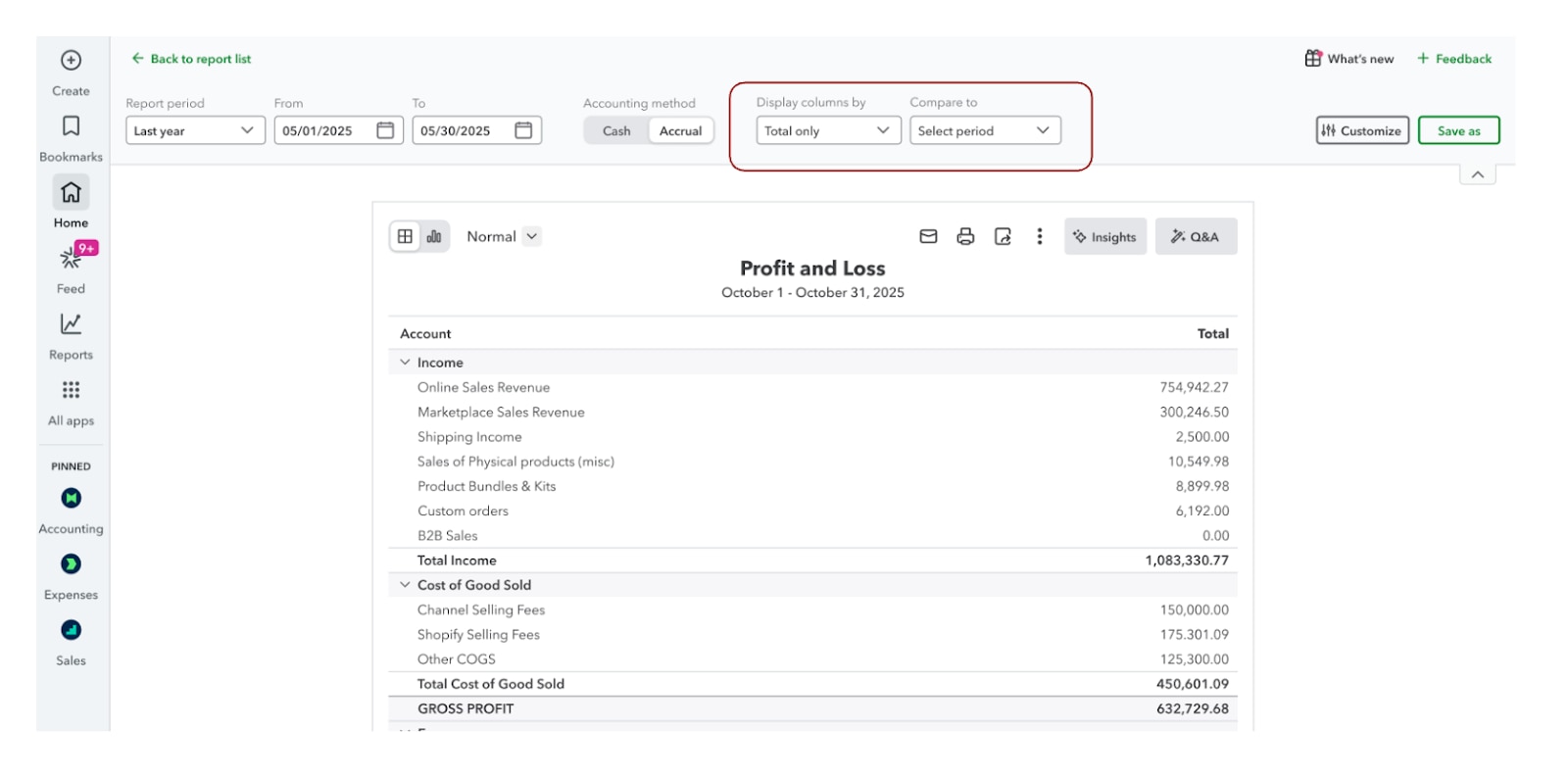
Test the requirement that changes your plan
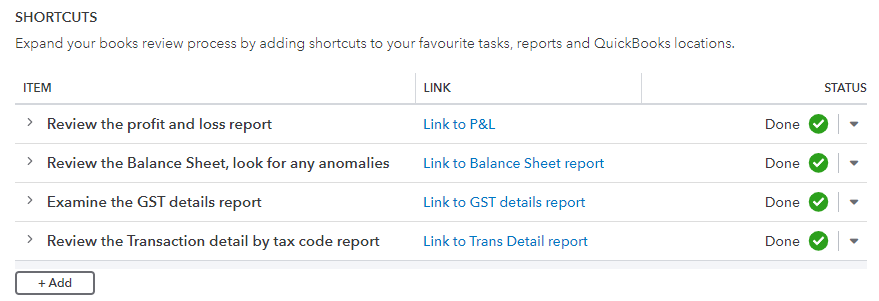
Choose one example that your business actually needs: an unpaid supplier bill, a foreign-currency bill, a stock return or a project with separately recorded costs. Use fictitious data in the 30-day trial and export the resulting report. Record which plan and add-ons were enabled; a feature visible during a broad trial may not belong to the subscription you buy.
Compare the Australian plan table with that output. Add payroll and payment charges to the quote, then work through the software trial checklist. Our practice dataset supplies a simple invoice-and-bank check.
Key takeaways
- QuickBooks Online costs $33, $60, $84 or $125 a month including GST (as at 18 October 2026); users are capped at 1, 3, 5 or 25.
- The banner promises 70% off for six months, but the offer terms say three months; budget on three.
- Payroll is extra and never discounted: $6 per active employee on Standard, or $10 a month plus $6 per employee on Advanced with award interpretation.
- Essentials adds bills, recurring invoices and multi-currency; Plus adds projects, inventory and purchase orders.
- The 30-day free trial needs no card and includes payroll; it is an alternative to the buy-now discount.
- Test corrections, grouped payments and the reports your business needs, not just a clean sales invoice.
Where to get help
- Intuit QuickBooks: plans and pricing, payroll plans and Australian support.
- Compare the alternatives: Xero pricing, MYOB pricing, QuickBooks vs Xero or another pairing in the accounting software comparison tool.
- Your bookkeeper or BAS agent: to review the trial reports and payroll setup. Work through the trial checklist with the person maintaining your books, or read how to choose a BAS agent.
- Australian Small Business and Family Enterprise Ombudsman: dispute support if you cannot resolve a billing dispute with a software supplier.
Related tasks
Browse more accounting software guides.
Did this guide help you finish your task?
Optional feedback helps us see which guides need more work.
Feedback is off while site analytics is unavailable or disabled.
We report your choice and this guide’s page through site analytics. Your analytics preference applies. About feedback and privacy.
Where to go from here
Xero vs QuickBooks Australia: Payroll, Plans and Practical Fit
Compare the practical tradeoffs against another product on your shortlist.
3 min readMYOB Business vs QuickBooks Online: An Australian Comparison
Compare the practical tradeoffs against another product on your shortlist.
3 min readAccounting Software Trial Checklist: Test Before You Buy
Test the workflow with your own requirements before buying.
3 min read
Frequently asked questions
How much does QuickBooks Online cost per month in Australia?
As at 18 October 2026, QuickBooks Online's standard monthly prices, including GST, are Simple Start $33, Essentials $60, Plus $84 and Advanced $125. New subscribers who buy now pay 70% less ($9.90, $18, $25.20 or $37.50) for the discount period, then the standard price. Payroll is extra: Standard Payroll is $6 per active employee a month and Advanced Payroll is $10 a month plus $6 per active employee.
Is the QuickBooks 70% off offer for 3 months or 6 months?
The pricing page banner says 70% off for 6 months, but Intuit's offer terms on the same page say the discount runs for the first 3 months, with the regular monthly price charged from month 4 (checked 18 October 2026). Budget on three discounted months unless your order confirmation shows six. On Simple Start that is the difference between a first-year cost of $326.70 and $257.40.
Does QuickBooks have a free trial in Australia?
Yes. QuickBooks Online offers a 30-day free trial with no credit card required, as at 18 October 2026. The trial includes QuickBooks Payroll, including Advanced Payroll, and you can pay any number of employees free during it. The trial is an alternative to the 70% off buy-now offer: after a trial you are asked for a card and charged the then-current price. Take the trial if you are unsure which plan fits.
How much does QuickBooks payroll cost in Australia?
QuickBooks Payroll is powered by Employment Hero and charged on top of any QuickBooks Online plan. Standard Payroll is $6 a month for each active employee, meaning anyone paid at least once in the billing month. Advanced Payroll adds award interpretation, rostering and time and attendance for $10 a month plus $6 per active employee. Prices include GST and are not discounted by QuickBooks' promotional offers (as at 18 October 2026).
Can I pay for QuickBooks annually?
Yes. Intuit's terms let you prepay QuickBooks Online for 12 months at a discount on the monthly fee, although the pricing page does not say how large the discount is. Payroll is still billed monthly. If you cancel during the prepaid year you keep access but get no refund, and the annual plan renews automatically at the then-current price unless you cancel first.
Can I cancel QuickBooks Online at any time?
Yes. There is no lock-in contract on monthly plans. Cancel in Settings, then Subscription and Billing. The cancellation takes effect at the end of the current monthly billing period, or at the end of the 12 months on an annual plan, and Intuit does not give pro-rata refunds. Export the reports and attachments you must keep for tax records before access ends.
Is QuickBooks cheaper than Xero or MYOB?
Sometimes. At standard prices on 18 October 2026, Simple Start plus Standard Payroll for five employees costs $756 a year, against $1,284 for Xero Comprehensive and $930 for MYOB Pro on annual billing. But Simple Start has one user and no supplier bills. On Essentials, the more comparable plan, the same team costs $1,080 a year. Compare the plan you would actually need.
Which QuickBooks plan do I need?
Choose by the first requirement that rules a plan out. Simple Start suits one person invoicing and tracking expenses. Essentials adds supplier bills, recurring transactions, multi-currency and three users. Plus adds inventory, purchase orders, projects, budgeting and five users. Advanced adds 25 users, custom permissions, workflows, custom reports and backup and restore. Payroll is a separate choice on any plan.
General information only. This guide doesn't take your personal or business circumstances into account and isn't financial, legal or tax advice. Rates and thresholds change — check the official sources linked in this guide and get qualified advice where your circumstances require it.